
In-Depth Analysis Of Rootkit Malware
How To Detect And Prevent


What if a person gets root-level access to your system, deactivates your antivirus software, spy your activities on the internet, and then steals your confidential data, and then sends it to the whole world? It’s terrifying, right? Well, this could be done with the help of rootkit.
In this article, you will gain an in-depth understanding of the rootkit, including its definition, impacts, how to detect and prevent it, and more. We will see how rootkits can damage your system and what are the best practices through which you can safeguard your system from malware.
What is a Rootkit, and its types?
What is a rootkit? A rootkit comprises two words: “root,” meaning admin or super user, and “kits,” meaning a set of tools. Together, they define a rootkit, a set of tools that gives someone the highest power in a system. A rootkit is malware that gives a threat actor the right to access and control a device. It can be entered into your device via spammy e-mails or accidentally downloaded malicious software. Rootkits can access your data, get complete control over your system, and install other malware, thus making them extremely dangerous.
There are several types of rootkits. These are as follows:
Hardware Rootkit: This malware attacks a system's hardware through fake firmware or driver updates. It can also attack a system's BIOS and steal data.
Application Rootkits: Application Rootkits modify the original files of genuine applications, like Word, Paint, etc., with infected files to give hackers control of the application.
Memory Rootkit: This malware has a short lifespan and hides in a system's RAM, consuming CPU power. It is considered one of the most dangerous rootkits.
Bootloader Rootkits: Bootloader Rootkits, also known as Bootkits, attack the loading process at machine startup and replace the original bootloader with a hacked one to control system boot.
Kernel Rootkits: This type of malware attacks the core of the OS and changes its functioning by replacing the operating system's kernel with its kernel.
How do rootkits work?
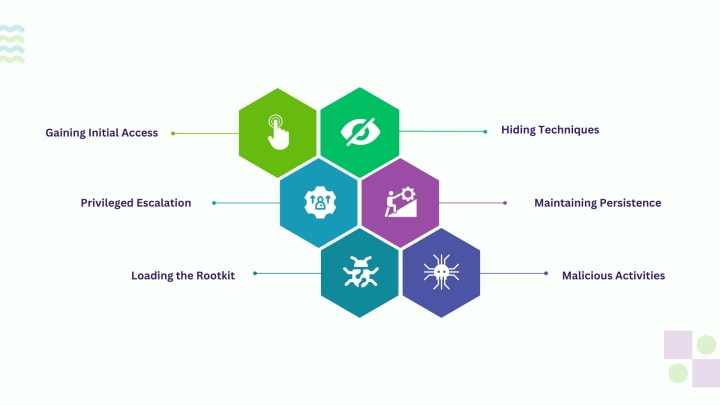
Rootkits work sophisticatedly; they can be entered via phishing emails, USB, vulnerabilities, or downloaded software. Due to their stealth in operation and under disguise, they remain a thorny issue as they compromise the system’s security and data. Let us see how rootkits work in a step-by-step method:
Gaining Initial Access:
Every malware needs initial access to a system. It can do this by exploiting software vulnerabilities, conducting social engineering attacks, or deceiving the user into running malicious software.
Privileged Escalation:
After penetrating the operating system, the rootkit seeks to acquire greater access rights than the actual logged-in user, such as the system administrator level or root. This is accomplished by using attacks or various methods of privilege escalation.
Loading the Rootkit:
Rootkits load their malicious codes into the target system’s memory by modifying the kernel or other system parts; hence, they do what they want to do with it.
Hiding techniques:
Rootkits use various techniques to stay hidden and continue damaging the system. These include hooking and patching, which means changing the original system function with malicious ones. Another way is; that rootkits hide their malicious files from anti-virus or utility software. They can disable an OS's antivirus and directly manipulate the kernel data structure.
Maintaining Persistence:
Rebooting and crashing can sometimes eliminate malware, so to remain in the system, malware maintains its persistence via modifying boot loaders, system configuration files, and scheduled tasks.
Malicious Activities:
Rootkit malware is stealthy, capable, and sneaky. It does malicious activities in the targeted system, such as stealing confidential data, logging keystrokes, or making the targeted system an admin to launch a DDoS attack on a website.
Detecting Rootkit Infections
Since rootkits have a disguising nature, they are not very easy to detect. However some antivirus software provides tools to detect them, but their usage stops if a rootkit has infected the kernel of an OS. Chkrootkit, Rkhunter, and TDSSKiller are well-known rootkit detection tools. Well, there are some techniques through which rootkits can be detected:
Signature Scanning: In this scanning, your system examines all the files to see if any malware or viruses exist.
Lagging and Strange Behavior: If your system exhibits odd behavior, such as rendering issues, random shutdowns, anti-software crashes, etc., malware might be hidden in your device.
Memory Dump: A memory dump is the contents of system RAM (Random Access Memory) created at a time. This helps collect diagnostic information during the crash to aid in troubleshooting.
Slow Device Performance: Another technique for detecting whether your system has a hidden rootkit is to monitor your device's performance. If your device is running slow, it might be a rootkit, as rootkits slow processes.
Depending on the sophistication of the malware, these techniques can be helpful but could be better. Eradicating rootkits from a system becomes complicated and expensive. Hence, the most common solution is reinstalling the operating system.
Preventing Rootkit Infections
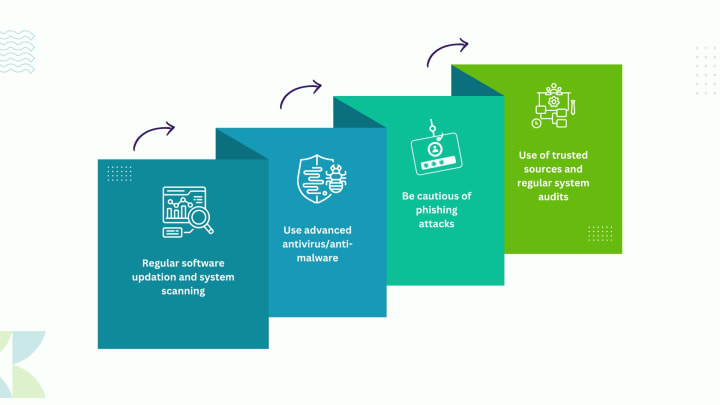
You have heard the old idiom, “Prevention is better than cure.” This statement fits perfectly with malware as it is safe to secure your system before it gets infected, rather than taking post-attack measures, as till then, your system will be compromised. Here are some best practices you can use to safeguard your system against malware:
- Regular software updation and system scanning: Many OSs, like Windows and macOS, bring new and enhanced features, like security updates, that effectively exterminate malware. Moreover, system scanning facilitates tracking the system’s files and apps.
- Use advanced antivirus/anti-malware: For many years, antivirus software has been one of the best ways to protect your system, and it is still the best. It uses several methods to detect and block threats from getting onto your devices; you can also use the incident response feature of cyber security services in case of any malware attack.
- Be cautious of phishing attacks: Phishing occurs when a threat actor deceives the user and gets into their systems via spammy e-mails, SMS, and other ways. Being careful of these phishing attacks, carefully acting on an e-mail, and not clicking a URL that does not have HTTPS can help prevent malware like trojans, worms, adware, and rootkits.
- Use of trusted sources and regular system audits: Trusted sources, such as official app stores or websites, are the best way to download and purchase software as they are free from malware. Regular auditing aids in quickly detecting and taking security measures for the malware’s suspicious activities, such as web page dysfunction or blue screen.
Malware Analysis of Rootkit Malware
Rootkit malware analysis entails identifying rootkits and concealed programs that allow the attacker unrestricted access to a system while being invisible. Even rootkits’ presence signals need more sophisticated methods, such as enhanced memory analysis and kernel profiling. We have learned about rootkits. Rootkit analysis involves various steps:
Identification: It becomes difficult to see if a rootkit is present in the computer because that is its general characteristic—it is stealthy. However, specific indicators, such as anomalies in the system’s behavior, the absence or change of system files, or increased network traffic, can be considered proof of a rootkit presence.
Extraction: After being identified, every rootkit must be removed from the infected system. This can be done using special tools or a dump of the running system to analyze it offline.
Static Analysis: The first step in discovering a rootkit is performing static analysis, which entails analyzing its code without running it. This can also afford valuable insights into how the rootkit works, hides itself, and how it can be defeated.
Dynamic Analysis: This type of analysis refers to executing rootkits in a specific and limited environment, such as a virtual machine or sandbox environment. This factor lets the researcher see how the rootkit behaves when used and how it interfaces with the operating system and other operations.
Reverse Engineering: This activity aims to analyze how the rootkit code works. This can assist in discovering what the rootkit can do, how it stays resident, and possible ways to counter it.
Countermeasures: Thus, from analysis, countermeasures can be devised to counteract and eliminate the rootkit from the infected systems. This can include generating ‘signatures’ for viruses to detect and block, producing fixes or upgrades for compromised programs, or implementing the right security procedures.
Since rootkits usually run with elevated privileges and reside sincerely in the system, malware analysis for such threats requires a profound knowledge of operating system internals, low-level programming, and reverse engineering. It is a continuous undertaking, given that rootkits are transmitted and those that already exist are upgraded so as not to be easily identifiable.
Conclusion
With cutting-edge technologies, attackers also get an extra edge, and they find loopholes in the system. Protecting your system from malware is a constant and updating task; if it gets to a rootkit, it becomes even harder. Understanding the types will give you more in-depth and specific knowledge about rootkits. But with the right detection tools, techniques, and proper prevention measures, you can safeguard your system from rootkits' menacing and devastating impacts and save your data.
The future looks more security-enhanced with AI, blockchain, zero-trust security, Adaptive threat detection, and many more technologies that will limit rootkits and help detect and prevent them more effectively and efficiently, thus ensuring a safer and more secure system, either its physical server or cloud servers, device, and data.
About the Creator
Anirudh Saini
Anirudh is a passionate part-time Content Writer and a full-time Learner who uses words to portray his knowledge. He has been specializing in writing on technical concepts like AI, Cloud Computing, SEO, and more.
Keep reading
More stories from writers in Geeks and other communities.
Goodbye, Mr. Duvall
It is turning out to be an interesting year. I was in the middle of teaching a class when a pop-up appeared on the screen announcing the death of Mr. Robert Seldon Duvall (yes, that was his full name). I was in the middle of a discussion on the obsession we have with winning when it comes to sports (the Winter Olympics was a theme), and I felt as though things were coming full circle. We had already lost Gene Hackman last year, and along with that titan, it feels though one particular golden age has closed off to be replaced by...?
By Kendall Defoe 4 days ago in Geeks
Everything You Should Know About Doctor Doom Before Avengers: Doomsday
With Avengers: Doomsday on the horizon, it’s the perfect time to brush up on the legendary villain the film is built around. If you only know the name, here’s the deal: Doctor Doom isn’t just another bad guy in armor. He’s one of Marvel’s most layered, brilliant, and stubbornly tragic characters — and his history with the heroes runs deep.
By Bella Anderson7 days ago in Geeks
📢 Raise Your Voice Thread: 02/19/2026
Our “Raise Your Voice Threads” are hosted most alternating Thursdays at 12PM ET to offer creators more avenues to uncover exceptional stories on Vocal. As we are continuously searching for fresh creators and inspiring stories, this thread provides an opportunity to exchange and discuss the stories that have moved and motivated us on Vocal.
By Raise Your Voice by Vocalabout 22 hours ago in Resources



Comments
There are no comments for this story
Be the first to respond and start the conversation.