
ChatGPT vs Google Gemini
Which AI Tools is Better for Content Writing

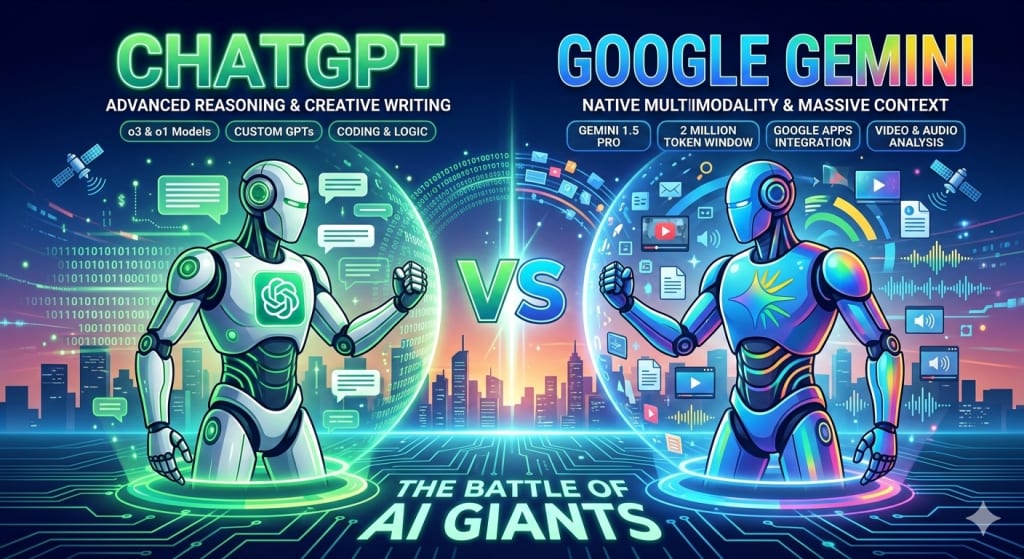
When I first started using AI tools for writing, research, and daily tasks, two names kept popping up everywhere: ChatGPT and Google Gemini. So, as a content writer, I decided to test both seriously and see which one actually helps more in real life.
AI News Today: What Makes AI Companies Worth Investing In Today
In this article, I’ll share my honest experience with both tools
- How they work
- How to use them effectively
- Their free features
- How to cancel subscriptions
- And finally, which one I personally prefer.
Let’s get started.

What Is ChatGPT?
ChatGPT is an AI chatbot developed by OpenAI. It helps users generate human-like responses, write articles, answer questions, explain concepts, and even help with coding.
In simple words, it feels like chatting with a smart assistant who understands what you want.
I mostly use ChatGPT for:
- Writing articles and blogs
- Brainstorming ideas
- Learning new topics
- Improving my English
- Solving technical problems
How to Use ChatGPT Effectively
Over time, I learned that the better your question, the better your answer.
Here’s how I use ChatGPT effectively:
- Be Clear in Your Prompts: Instead of saying “Write something,” I say: “Write a 1000-word SEO article on digital marketing in simple English.”
- Give Context: If I’m writing for beginners, I mention it. This helps a lot.
- Ask for Improvements: After getting content, I ask: “Make this more engaging” or “Simplify this.”
- Use It for Editing: I paste my draft and ask for grammar and clarity fixes.
- Break Big Tasks into Small Ones: One section at a time works better than everything at once.
5 Free ChatGPT Prompts I Often Use
Here are some free prompts you can try:
- “Write an SEO-friendly article on [topic].”
- “Explain this concept like I’m 14 years old.”
- “Summarize this text in simple words.”
- “Generate 10 blog ideas about [niche].”
- “Rewrite this paragraph in a friendly tone.”
These prompts alone can improve your productivity.
How to Cancel ChatGPT Subscription
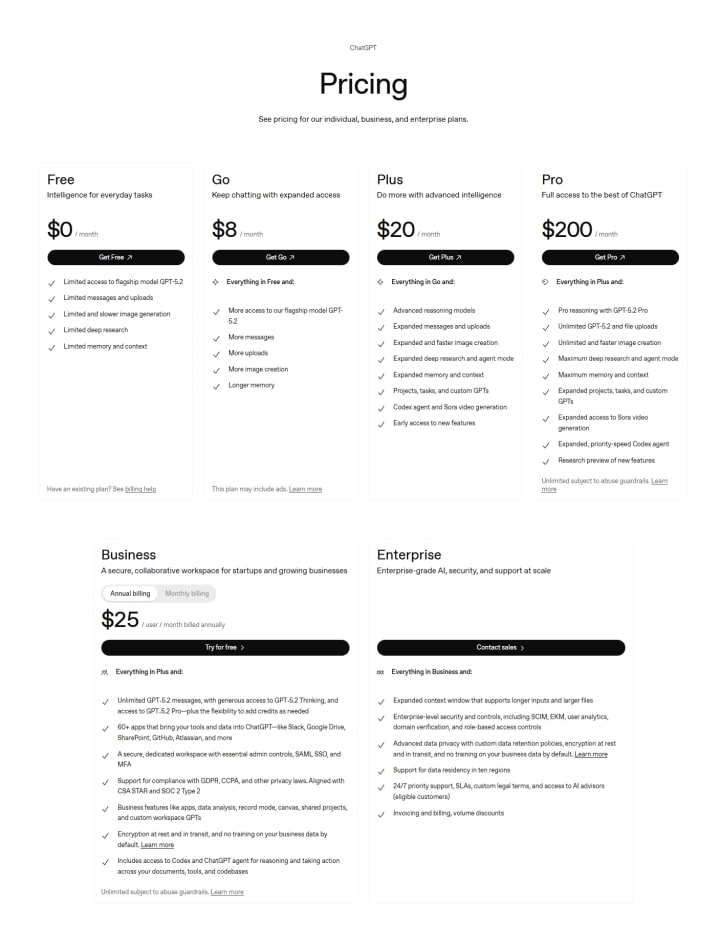
If you’re using ChatGPT Plus and want to cancel:
- Log in to your account
- Click on your profile
- Go to “My Plan”
- Select “Cancel Subscription”
- Confirm cancellation
Your paid access will continue until the billing period ends.
What Is Google Gemini?
Google Gemini is an AI assistant created by Google. It is integrated into Google services and focuses on search, productivity, and smart assistance.
Gemini feels more connected to the internet and Google tools like Docs, Gmail, and Search.
I use Gemini mainly for:
- Quick research
- Real-time information
- Google-related tasks
- Fact-checking
- Email drafting
How to Use Google Gemini Effectively
Here’s how I get the best results from Gemini:
- Ask Real-Time Questions : Gemini works well for current topics.
- Use It with Google Tools: It connects smoothly with Docs and Gmail.
- Be Specific: Detailed questions give better answers.
- Use Follow-Ups: You can refine answers by asking more questions.
- Request Sources: Gemini often gives references, which helps in research.
5 Free Gemini Prompts I Recommend
Try these free Gemini prompts:
- “Search and summarize the latest news on [topic].”
- “Draft a professional email for me.”
- “Explain this with examples.”
- “Compare two products for me.”
- “Find pros and cons of [subject].”
These are great for daily productivity.
How to Cancel Gemini Subscription
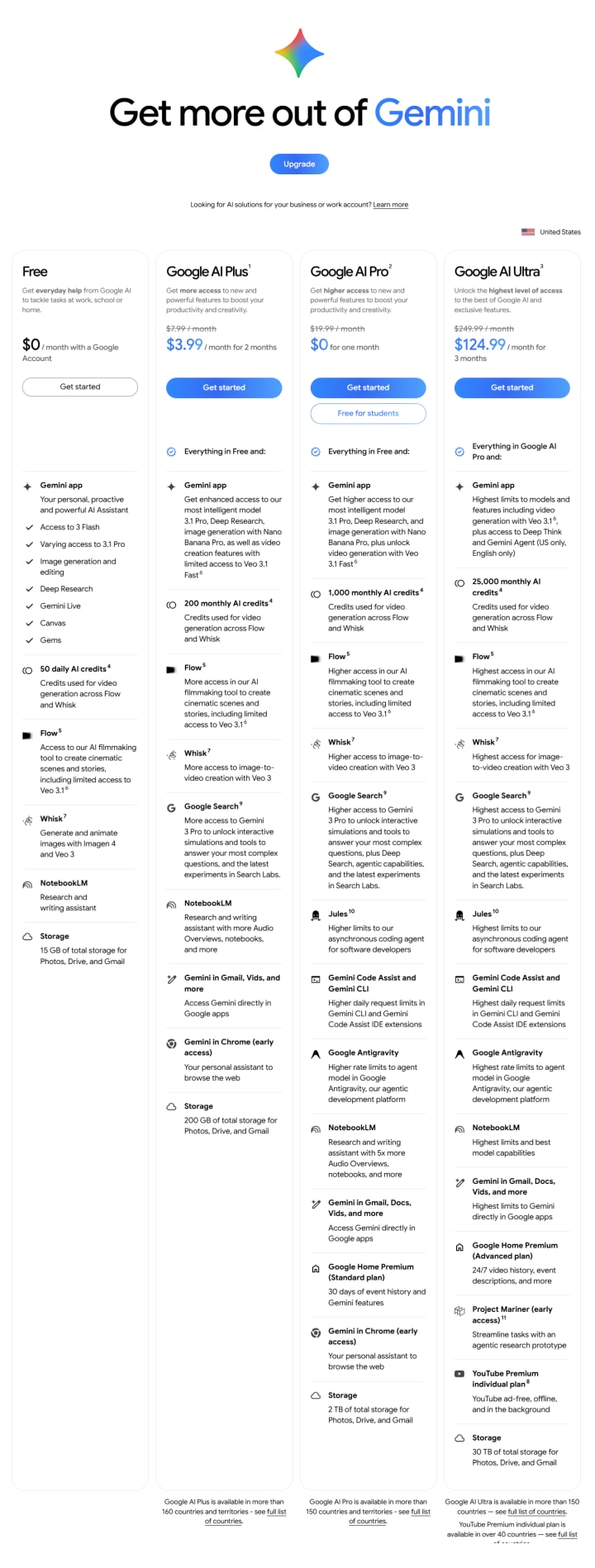
If you’re using Gemini Advanced:
- Open your Google account
- Go to Subscriptions
- Find Gemini
- Click “Cancel”
- Confirm
After that, you’ll return to the free version.
Basic Comparison: ChatGPT vs Google Gemini
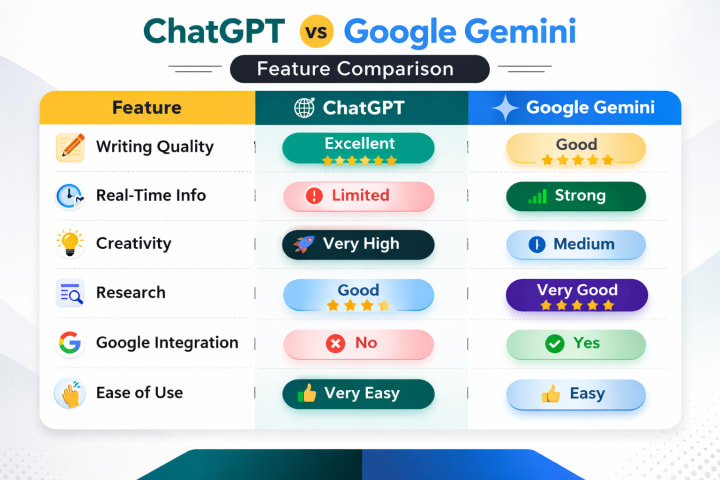
Here’s my simple comparison:
| Feature | ChatGPT | Google Gemini |
|--------------------------|-----------|---------------|
| Writing Quality | Excellent | Good |
| Real-Time Info | Limited | Strong |
| Creativity | Very High | Medium |
| Research | Good | Very Good |
| Google Integration | No | Yes |
| Ease of Use | Very Easy | Easy |
From my experience, ChatGPT is better for creativity, while Gemini is stronger in search-related tasks.
Unique Benefits of ChatGPT
These are the things I love most about ChatGPT:
1. Better Writing Skills
ChatGPT helps me write more naturally and creatively.
2. Strong Conversation Flow
It feels like talking to a real person.
3. Great for Content Creators
For bloggers, writers, and students, it’s very helpful.
4. Flexible Usage
You can use it for almost anything: stories, scripts, lessons, coding, and more.
5. Custom Instructions
You can tell it how you want responses, which saves time.
Unique Benefits of Google Gemini
Gemini also has its own strengths:
1. Real-Time Data
It gives updated information faster.
2. Google Ecosystem
It works well with Gmail, Docs, and Search.
3. Research Support
Great for academic and factual work.
4. Source-Based Answers
Often provides links and references.
5. Productivity Focus
Helpful for office work and daily tasks.
Final Review: Which One Is Better?
Now, the big question: ChatGPT vs Google Gemini — which is better?
From my honest experience:
Choose ChatGPT If:
- You are a writer, blogger, or student
- You need creative content
- You want better storytelling
- You focus on SEO writing
Choose Gemini If:
- You need real-time information
- You use Google tools daily
- You do research work
- You want fact-based answers
My Personal Choice
As a content writer and digital learner, I personally prefer ChatGPT for most of my work. It helps me think better, write better, and express ideas more clearly.
However, I still use Gemini when I need quick facts or current data.
So for me:
- ChatGPT = Creativity & Writing
- Gemini = Research & Updates
Both are powerful tools. The best one depends on your needs.
Final Words
AI tools are changing how we work, learn, and create. Instead of choosing only one, I suggest learning both. When you know how to use them properly, they can save you hours every day.
If you want, I can also help you turn this article into an SEO-optimized blog post or add keywords for ranking. Just let me know.
About the Creator
Keep reading
More stories from Hassan Saleem and writers in Geeks and other communities.
AI News Today: What Makes AI Companies Worth Investing In Today
Two years ago, artificial intelligence companies could raise capital on narrative alone. A compelling vision, an elegant demo, and a promise to “transform everything” were often enough to unlock venture funding. Today, that playbook is obsolete. Investors are no longer underwriting ambition they are underwriting operational proof.
By Hassan Saleem8 days ago in Geeks
THE MAN YOU THOUGHT YOU KNEW FROM YOUR CHILDHOOD
For many people, childhood memories are stitched together by television shows that felt safe, familiar, and quietly meaningful. You may not remember every episode, but you remember faces. You remember voices. And sometimes, you remember a character so clearly that they begin to feel like someone who existed in your own home. For millions of viewers, that character was Sam McGuire, the dad from Lizzie McGuire. And the man behind that role was Robert Carradine.
By S.A Charles4 days ago in Geeks
Echoes
I stepped carefully around the corner, the familiar sights and sounds hitting me like a brick to the face. My eyes watered. I could practically see us, all of us, back then, clustered around the outdoor tables in front of the pizza shop, the bar, the coffee shop. I could smell the various stalls from the events we’d been to on this street. I could taste the churros and nachos.
By Phoenixica247 days ago in Fiction




Comments
There are no comments for this story
Be the first to respond and start the conversation.