
10 Phone Photography Hacks
That Make Your Pics Look 10x More Expensive

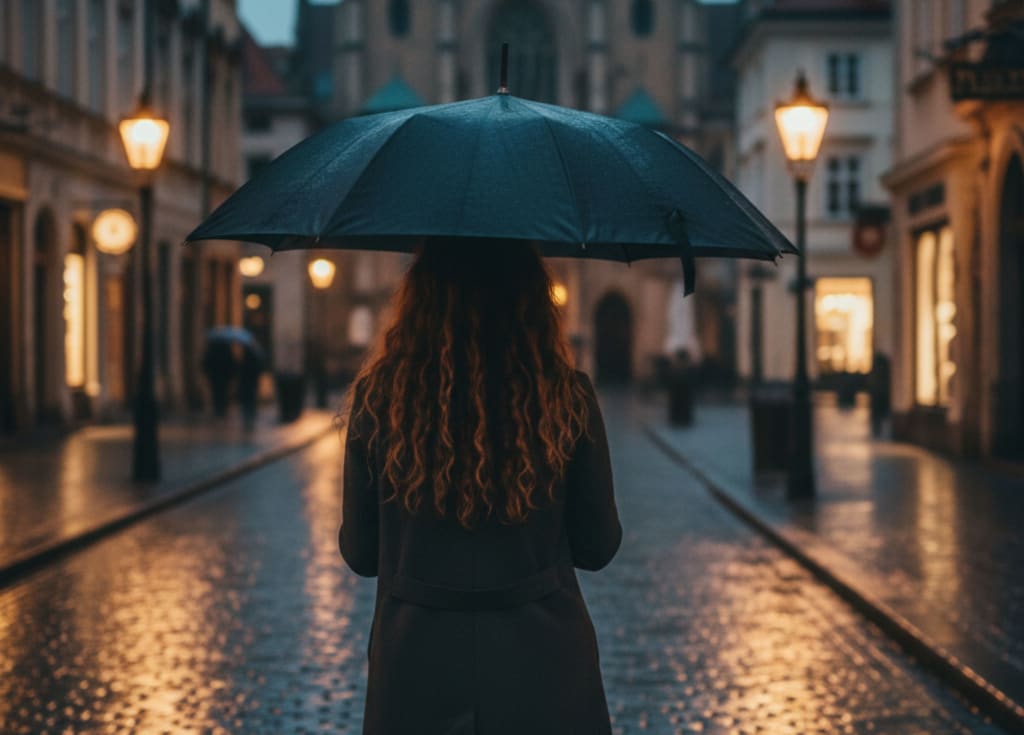
The tiny camera in your pocket can look like a $3,000 setup—if you stop using it like everyone else
The first time someone asked me, “Wait… you shot this on your phone?” I felt unreasonably smug for a solid 48 hours.
It wasn’t even a complicated photo. Just my friend standing under a grimy parking garage light, city blur behind her. No filters. No presets. Just a few small things I’d learned after years of taking flat, washed-out phone pics that never matched the moment in my head.
That gap—between what you saw and what your camera gives you—is brutal.
You see golden light. Your phone gives you: “Hi, would you like this gray, crunchy mess with blown-out sky and dead-looking skin?”
So most people assume:
“I just need a better phone”
Or: “I guess I’m not photogenic”
Or the classic: “Why do my pictures always look cheap?”
You don’t need a better face or a $4,000 camera.
You need to stop doing what every other person with a phone is doing.
Here are the exact phone photography hacks that make people swear I’m hiding a secret camera—and how you can use them too.
Hack 1: Treat light like money and spend it on faces, not backgrounds
The quickest way to make a phone photo look expensive is not a filter.
It’s finding good light and putting it on the right thing.
Most people do this backwards.
They stand in front of a bright window, outside at noon, or with the sun behind them—and then wonder why everything looks harsh, flat, or blown out.
Next time you take a photo of a person, try this:
Turn them toward the biggest light source you can find: a window, open door, cloudy sky, bright wall.
Watch their face. When the light softens the shadows under their eyes and nose, you’ve found it.
Step closer. Then closer again. Phone cameras love close light.
If you’re outside, avoid overhead sun. Walk them into open shade—under a tree, next to a building, just beyond where the harsh light ends.
The background doesn’t need perfect light.
Their face does.
Expensive photos look like someone carefully placed the light. You’re doing the same thing—just by moving your feet.
Hack 2: Clean your lens like you care how your life looks
This sounds stupidly obvious, but it changes everything.
We wipe our screens constantly and then forget the tiny glass circle doing all the actual work.
Make it a habit: before any photo you want to like, gently wipe your camera lens with:
Your shirt (inside is safer than outside)
A glasses cloth
Tissue (not soaked, just dry)
The difference is wild:
Suddenly your “my life is a blur” photos become clear, sharp, and crisp.
A dirty lens makes pics look cheap: hazy highlights, weird veiling glare, low contrast, random smears of light.
A clean lens gives you that clean, high-end look before you even touch editing.
It’s the easiest “my photos just got more expensive” switch you’ll ever flip.
Hack 3: Tap to expose for the brightest spot (and stop blowing out the sky)
Here’s a quiet little truth: phones are terrified of the dark.
They see a bright sky and a darker face and panic, trying to brighten everything at once.
That’s how you get washed-out backgrounds and faces that look oddly over-smoothed and weird.
You fix this with one small move:
Tap on the brightest important thing in your frame.
Usually: the sky, the background lights, or the brightest part of a face.
Then drag your finger down to slightly darken the image until the bright parts have detail again.
Yes, it’ll make the shadows darker.
But darker shadows are better than blown-out ugly light.
The photos that scream “expensive” always have controlled highlights. Skies with color. Street lights that glow instead of explode. Skin that still looks like skin.
You’re not just taking a photo; you’re telling your camera who’s in charge.
Hack 4: Move your feet, not your zoom
Digital zoom is basically asking your phone: “Can you crop this for me, badly, in advance?”
That crunchy, cheap look?
A lot of it comes from pinching to zoom.
Instead:
Use your feet as your zoom. Walk closer. Then closer again.
If your phone has multiple lenses (0.5x, 1x, 3x), tap those instead of pinching. Those are actual lenses, not digital crop.
If you must zoom, go just a little—not all the way in. Extreme digital zoom is where detail goes to die.
When I stopped pinching to zoom and started literally walking across the room, my photos instantly looked sharper, cleaner, and more intentional.
Expensive cameras don’t make images look good because they zoom; they look good because someone bothered to move.
Hack 5: Use “window light + plain wall” like an at-home studio
If I told you some of my most “professional” looking portraits were shot against a random wall in my hallway, you might not believe me.
But here’s the setup:
Find a window with soft light. Morning, late afternoon, or cloudy days are your best friends.
Stand (or place your subject) about 2–4 feet from the window, facing it or turned slightly to one side.
Behind them? A plain wall, curtain, or uncluttered space.
Turn off all the overhead lights. Mixed light is where photos go to look cheap and yellow.
Your phone will suddenly act like it’s part of a studio team.
Skin tones look smoother. Eyes catch a little sparkle. The background falls away.
You don’t need a white wall either. Light gray, beige, even a soft colored wall can look expensive. The point is: simple background, good light, clean frame.
That combination beats “fancy restaurant with terrible lighting” every time.
Hack 6: One subject, one story—crop like you mean it
Most phone photos try to say five things at once.
“Here’s my coffee and my laptop and my friend and the cafe and the plant and the ceiling lights!”
Which translates visually to: “Nothing is important here.”
Notice how high-end photos feel calm. Focused. Intentional. That’s not the camera. That’s editing with a spine.
When you’re about to take a photo, ask yourself quietly:
“What’s the one thing this picture is about?”
If it’s your friend: fill more of the frame with them. Cut out half the background.
If it’s the food: get closer. You don’t need the entire table.
If it’s the view: step back or lift your phone higher and let the landscape breathe.
And afterwards, use the crop tool ruthlessly. Cut out random feet, stray bags, half-people on the edge of the frame.
Tight, intentional framing is one of the fastest ways to make your photos look like someone cared.
Because you did.
Hack 7: Shoot slightly lower or higher than eye-level for drama
The easiest way to make a photo look basic is to shoot everything from the same height: standing, phone at eye-level.
Your camera becomes your boring friend who tells every story in the same flat tone.
Try this instead:
For portraits that feel powerful, hold your phone a bit lower and tilt up slightly. It gives the subject presence and strength.
For moments that feel tender or cinematic, hold your phone slightly above eye-level and angle down. Think of the way movie scenes look over someone’s shoulder or from the top of a staircase.
For objects (coffee, books, food), experiment with straight overhead shots—phone directly above, everything lined up neatly.
That small perspective shift changes the emotional feel of the shot.
Same person, same place, same phone—but suddenly it looks like a frame from a film instead of a random snapshot.
Expensive isn’t about pixels. It’s about point of view.
Hack 8: Use gridlines and the rule of thirds, then break it on purpose
Hidden inside your camera settings is one of the most quietly powerful tools: gridlines.
Turn them on.
Most phones tuck this under “Camera” in settings: just enable “Grid.”
Now, instead of just slapping your subject in the dead center every time, try this:
Place their eyes along the top horizontal line of the grid.
Line up their body or a building edge with one of the vertical lines.
Put the horizon on the top or bottom third, not slicing through the middle of the frame.
This is the “rule of thirds,” and it immediately makes your composition look intentional.
Once you’ve played with it for a while, you’ll start to feel when centering does work—like dramatic portraits or symmetrical architecture. The key difference is that now you’re not centering out of habit; you’re centering on purpose.
That’s what feels expensive: choice, not accident.
Hack 9: Edit like a human, not a cartoon
Editing is where a lot of good photos go to die.
You’ve seen it: skin blurred into plastic, neon orange sunsets, teal trees, eyes so sharp they look unblinking and haunted.
If you want your photos to look expensive, think of editing like makeup done by someone who actually listens when you say “natural.”
Whether you use your phone’s built-in editor, VSCO, Lightroom Mobile, or Snapseed, try this simple order:
Exposure & Contrast
Brighten just enough so you can see detail.
Add a touch of contrast so it doesn’t look washed out.
Highlights & Shadows
Pull highlights down a bit to protect bright areas.
Lift shadows slightly, but don’t make everything flat.
White Balance
Slide a little warmer if skin looks sickly or too blue.
Cooler if everything is screaming yellow.
Clarity/Structure/Sharpening
Use this lightly. A little on objects, very little on faces.
Color
Desaturate just a touch.
Rich, not radioactive.
The test I use:
“If I didn’t know this person, would I believe their skin could actually look like that in real life?”
If the answer is no, undo something.
The best edits don’t scream, “Look at this filter!” They whisper, “Of course it looked like this.”
Hack 10: Tell a tiny story instead of “smile at the camera”
The most expensive-looking photos aren’t technically perfect.
They’re emotionally specific.
Think about the last photo you saw that made you stop scrolling. It probably didn’t impress you because it was tack sharp. It hit you because it felt like something: a mood, a memory, a secret.
Phone photography gets boring when every shot is:
“Stand there. Look at me. Smile.”
Try this instead:
Catch people in-between: reaching for a cup, pushing hair out of their face, laughing at something off-camera.
Have them look away: out a window, down at their hands, toward the light.
Give them a tiny prompt: “Fix your sleeve,” “Walk toward me slowly,” “Pretend you’re waiting for someone who’s late.”
You’re not documenting a passport queue.
You’re stealing a little scene from a movie that only exists for three seconds and then never again.
When you start thinking in moments instead of poses, your photos suddenly feel like they belong to a bigger story—and that’s what makes them look like they cost more than a phone app and a bored tap.
The real flex isn’t the phone—it’s the way you see
The irony is, the people with the fanciest cameras often envy the freedom of phone photographers.
No lenses to swap. No heavy bag. No excuse.
Just this: a tiny rectangle of glass and metal and whatever you decide to notice today.
You can scroll past your own life, capturing it in dull, flat proof-you-were-there snapshots.
Or you can start moving two steps to the left for better light.
You can stop zooming like a tourist and walk closer like a director.
You can choose one subject, clean the frame, darken the highlights, tilt your hand slightly up or down, and ask your friend to look out the window instead of at you.
None of that needs a new phone.
It needs a different level of attention.
The quiet kind that says: this moment matters enough for me to try.
The next time someone asks you, “Wait… you shot this on your phone?”
You’ll know the truth. It was never just the phone.
It was you, finally treating your life like it deserves to be seen well.
About the Creator
abualyaanart
I write thoughtful, experience-driven stories about technology, digital life, and how modern tools quietly shape the way we think, work, and live.
I believe good technology should support life
Abualyaanart
Keep reading
More stories from abualyaanart and writers in Photography and other communities.
A Deep Dive into the Vivo X300
In a crowded smartphone market, the Vivo X300 stands out not just as another flagship device, but as a serious contender for photography lovers, power users, and anyone who wants top-tier performance in a relatively compact form. With its powerful hardware, thoughtful design, and advanced camera system, the X300 aims to strike a perfect balance between portability, productivity, and imaging prowess. Here’s a detailed look at what makes the Vivo X300 compelling—and where it could be better
By abualyaanart3 months ago in Photography
ChatPic.org Platform Analysis: Speed, Privacy & Sustainability in Image Hosting
Introduction In the modern internet landscape, visual communication has become central to how people interact online. Whether in gaming forums, tech communities, educational discussions, or private chats, images are now used as fast carriers of information. Screenshots explain problems instantly, memes communicate humor within seconds, and visual references simplify complex ideas.
By Backlinks Cart4 days ago in Photography
We are England
Met a dear friend for a coffee the other day, walking to the appointment through familiar territory. I twice lived in South Norwood in the 1970s, a district of South London (SE25) so named for the great North Wood that covered the land 500 years ago. Some tiny remnants of this once expansive forest remain, as does considerable industrial archaeology and broader social and economic history.
By Raymond G. Taylor7 days ago in Photography



Comments
There are no comments for this story
Be the first to respond and start the conversation.