
WhatsApp Business API: A Complete Guide to Business Messaging in 2026
Understanding How Messaging Platforms Are Shaping Modern Customer Communication

Over the past decade, the way businesses communicate with customers has changed dramatically. Traditional channels such as email and phone support are still widely used, but instant messaging has become one of the most preferred ways for people to interact with brands. Customers increasingly expect quick responses, convenient updates, and support that feels personal rather than formal.
Messaging platforms have therefore evolved from simple communication tools into important business channels. Many companies now use messaging to send order updates, answer customer questions, and manage support requests in real time. As a result, messaging has become an essential part of the modern customer experience.
Among the various platforms available today, WhatsApp has become one of the most widely used messaging services globally. With billions of users across different regions, it offers businesses an opportunity to communicate with customers in a space where people already feel comfortable and familiar.
As organizations grow and begin handling larger volumes of conversations, more structured messaging systems become necessary. This is where solutions like the WhatsApp Business API play an important role.
The Growing Importance of Business Messaging
Customer expectations have changed significantly in recent years. People now prefer communication that is quick, direct, and convenient. Waiting on hold during a phone call or searching through long email threads can feel inefficient compared to simply sending a short message.
Because of this shift, messaging platforms have gradually become part of many organizations’ communication strategies. Companies now use messaging channels for several purposes, including:
- Customer support inquiries
- Order confirmations and delivery updates
- Appointment reminders
- Service notifications
- Product information requests
Messaging platforms allow these interactions to happen in a more conversational way, which often improves the overall experience for customers.
Understanding the WhatsApp Business API
The WhatsApp Business API is designed to help organizations manage messaging at a larger scale. Unlike the standard WhatsApp application used for personal conversations, the API allows businesses to connect messaging capabilities with other systems, such as customer relationship management software or help-desk platforms.
This integration enables organizations to manage large numbers of conversations more efficiently while maintaining a conversational style of communication.
Some of the key capabilities typically associated with the API include:
- Sending notifications and updates through messaging
- Integrating messages with support or ticketing systems
- Automating responses to common customer questions
- Managing conversations across customer support teams
Instead of treating messaging as a standalone tool, the API allows businesses to incorporate messaging into broader customer engagement workflows.
How Structured Messaging Works
One important feature of business messaging systems is the use of pre-approved message templates. These templates help ensure that notifications sent to customers are clear, useful, and relevant.
Examples of structured messages often include:
- Order confirmations
- Delivery or shipping updates
- Appointment reminders
- Payment notifications
Because these templates are reviewed in advance, they help maintain quality and prevent unwanted or confusing messages from being sent to users.
Once a customer begins a conversation, businesses can respond more freely in a conversational format, similar to a regular chat.
Automation and Smart Responses
As messaging volumes grow, many organizations also introduce automation to handle routine interactions. Automated systems or chatbots can help answer frequently asked questions, provide order information, or guide users to the appropriate support team.
For example:
- A customer asking about business hours may receive an instant automated reply.
- Someone requesting order status might receive real-time tracking details.
- More complex issues can be transferred to human support agents when needed.
Automation does not replace human support but instead helps reduce repetitive tasks and allows teams to focus on more complex inquiries.
Rich Messaging Experiences
Another advantage of modern messaging platforms is the ability to share more than just plain text. Businesses can include additional content types that make communication clearer and more engaging.
These may include:
- Images or product visuals
- Videos explaining solutions or instructions
- Documents such as invoices or confirmations
- Interactive buttons that guide users toward specific actions
These elements can make conversations easier to understand and more useful for customers seeking information.
Practical Business Use Cases
Many organizations use messaging platforms for practical everyday interactions with their customers.
Customer Support Conversations
Messaging allows customers to ask questions quickly and receive responses without waiting for a phone call. Support teams can review conversation history and respond with context, improving efficiency.
Transactional Notifications
Businesses often send updates about orders, deliveries, or appointments. These updates help keep customers informed about important events related to their purchases or services.
Guided Customer Interactions
Interactive options within messages can help guide users toward the information they need, reducing confusion and making conversations easier to navigate.
The Broader Business Messaging Ecosystem
As messaging becomes more important for customer engagement, many technology providers have begun developing tools that help organizations manage messaging more effectively.
Software companies working in areas such as digital transformation, communication platforms, and automation often contribute to the development of messaging solutions. Organizations including technology consulting firms and software development companies help businesses integrate messaging tools with their internal systems.
This broader ecosystem supports the continued growth of messaging-based customer communication strategies across industries.
The Future of Messaging in Business Communication
Looking ahead, messaging is expected to remain an important part of how companies interact with their audiences. As artificial intelligence and automation technologies improve, messaging systems may become even more capable of providing quick and accurate responses.
Future developments may include:
- smarter automated responses
- deeper integration with business platforms
- more personalized customer interactions
- Improved analytics for understanding conversations
These advancements could make messaging an even more powerful channel for delivering customer support and information.
Final Thoughts
Messaging platforms have become an essential part of modern communication, both for individuals and businesses. As customer expectations continue to evolve, organizations are increasingly exploring ways to communicate through channels that are fast, convenient, and familiar.
Solutions such as the WhatsApp Business API represent one approach to managing large-scale messaging interactions while maintaining a conversational experience. When implemented thoughtfully, these systems can help businesses provide clearer updates, faster responses, and more helpful customer interactions.
As digital communication continues to evolve, messaging will likely remain a key part of how organizations build relationships and deliver better ex
About the Creator
Keep reading
More stories from Olivia Carter and writers in Futurism and other communities.
Machine Learning Wavelet Transform and Its Role in Modern AI Solutions
Artificial intelligence continues to reshape the way organizations analyze and understand data. As the volume and complexity of information grow, researchers and engineers are constantly looking for more effective ways to process signals, images, and time-series data. One mathematical technique that has gained increasing attention in recent years is the wavelet transform, especially when combined with machine learning models.
By Olivia Cartera day ago in Futurism
Australia Pro AV Market: Hybrid Work Demand, Digital Signage & Smart AV Technologies
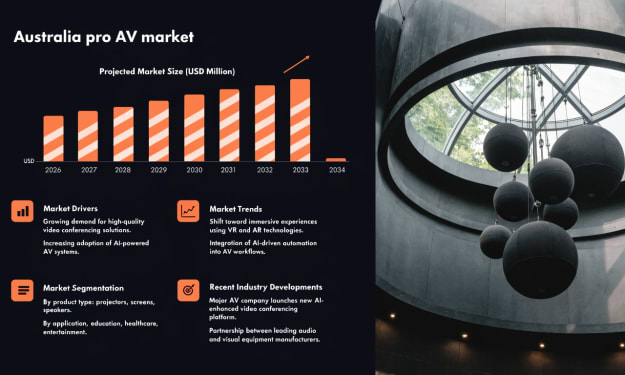
According to IMARC Group, the Australia pro AV market reached a value of USD 93.9 Million in 2025 and is projected to reach USD 133.6 Million by 2034, growing at a compound annual growth rate (CAGR) of 3.88% during 2026–2034. The market is expanding as organizations increasingly adopt advanced audiovisual solutions to support communication, collaboration and digital engagement. Hybrid work environments are encouraging businesses to invest in video conferencing systems, smart displays and integrated collaboration platforms that connect remote and in-office teams. At the same time, industries such as retail, hospitality and tourism are investing in digital signage to improve customer engagement and brand communication. As companies focus on creating interactive and technology-driven environments, professional AV solutions are becoming essential tools for modern workplaces, entertainment venues and commercial spaces across Australia.
By Kevin Cooper3 days ago in Futurism
Agentic AI in Energy Market to Exceed USD 10,700 Million By 2034
Agentic AI in Energy Market Overview The global Agentic AI in Energy Market is projected to reach approximately USD 10,700 Million by 2034, rising from nearly USD 480 Million in 2024. This expansion reflects a strong CAGR of 36.40% during the forecast period from 2025 to 2034. Market growth is being driven by the increasing use of autonomous artificial intelligence systems to manage complex energy operations, including power generation optimization, grid management, predictive maintenance, and energy demand forecasting. Energy companies are integrating agentic AI technologies to automate decision making processes and improve the efficiency of energy infrastructure.
By Roberto Crum3 days ago in Futurism



Comments
There are no comments for this story
Be the first to respond and start the conversation.